Elevate Your Real Estate Brand: 5 Free LinkedIn Banner Templates
In the competitive world of real estate, your digital presence is often the first handshake with a potential client. A polished, professional LinkedIn profile isn't just a nice-to-have; it's a fundamental tool for building trust and authority. That wide banner image at the top of your page is prime visual real estate—pun intended. Using a generic photo or a poorly designed graphic can undermine your credibility before you even make a connection. This is where having access to high-quality, editable design assets becomes a practical advantage for any realtor looking to stand out.
Why a Professional LinkedIn Banner is Non-Negotiable for Realtors
Think of your LinkedIn banner as a digital billboard for your personal brand. It communicates your professionalism, your market area, and your aesthetic sensibility in a single glance. A cohesive brand identity, supported by consistent visual elements across your social media graphics, helps you become more recognizable. When a past client or a referral tries to find you, a strong visual presence makes you instantly memorable. It’s about more than just looking good; it’s about strategic brand perception and fostering immediate audience engagement.
The challenge for many agents is time and design skill. You're busy with showings, negotiations, and client meetings. Crafting a custom banner from scratch in a complex design program can be a frustrating time sink. This is precisely the problem the Real Estate - 5 Free LinkedIn Banner templates solve. They provide a professional foundation that you can customize in minutes, not hours, using a free and intuitive online tool.
Inside the Download: What You Actually Get
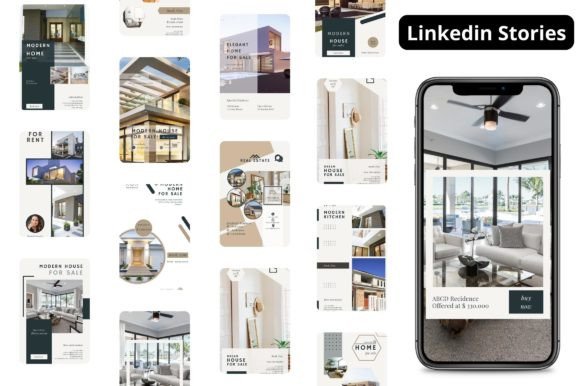
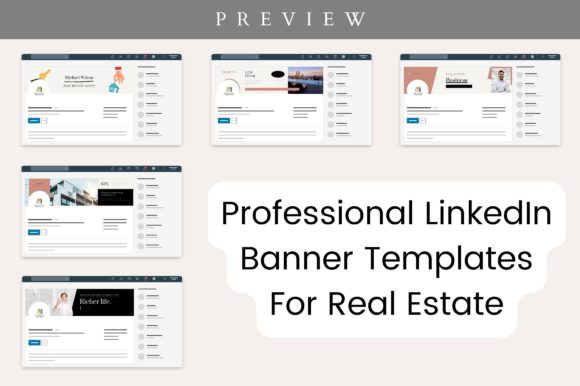
This package is designed for immediate usability. Upon download, you receive a clear Instructions PDF that walks you through the entire process, eliminating any guesswork. The core of the download consists of 5 Sample Template Posts, each showcasing a different design style and layout tailored for the real estate industry. These aren't just static images; they are fully Editable Templates ready for your personal touch.
Every element within these templates is customizable in Canva. This means you have complete control to make them your own:
- Images: Swap the placeholder photos with high-quality images of your listings, your local market, or a professional headshot.
- Color: Adjust the color palette to match your existing brand identity or the aesthetic of your brokerage.
- Font: Change the typeface to reflect your brand's personality, whether it's modern and clean or classic and trustworthy.
- Elements: Move, resize, or remove any graphic element, icon, or shape to perfect the composition.
- Background Color: Alter the base color to create contrast or align with your logo.
- Resize: While the template is optimized for the LinkedIn banner size of 1584 x 396 pixels, you can easily resize the design for other social media platforms.
The templates are provided in a format that allows you to free to download in any format you need—PNG, SVG, JPG, or PDF—directly from Canva once you've finished editing.
How to Use These Templates for Maximum Impact
The process is built around simplicity. Canva is a free online tool for graphic designing, so there's no software to install or subscription to manage. Here’s a straightforward approach to getting your new banner live:
- Access the Templates: Follow the instructions to open the template links in Canva. You'll be prompted to create a free account if you don't have one.
- Choose Your Base Design: Browse the five provided options. Select the one whose layout and visual hierarchy best suit your message. Do you want to highlight a specific neighborhood? Feature your tagline? Promote a recent sale?
- Customize with Purpose: This is where you inject your brand. Use your brand colors consistently. Select a premium font that is highly legible at smaller sizes—often a clean sans serif font works best for web design and social media graphics. Ensure any text is concise and impactful. Your name, title, and a simple value proposition or contact method are usually sufficient.
- Review and Refine: Zoom out to see how the banner will look on a profile. Check for visual balance. Is there enough contrast between the text and the background? Is the overall design too cluttered? A clean, focused design projects confidence and professionalism.
- Download and Upload: Export your finished design as a high-resolution PNG or JPG. Then, simply upload it to your LinkedIn profile under the "Edit intro" section.
By leveraging these design assets, you save your priceless time while ensuring your LinkedIn profile communicates the right message. It’s a practical step toward building a stronger brand identity