Take Control: A Free Expense Tracker for Your Financial Goals
Managing money can feel overwhelming, especially when you’re juggling multiple projects, side hustles, or the general complexities of daily life. Spreadsheets are powerful, but they often lack the visual clarity we need to see exactly where our money is going. This is where having a dedicated, easy-to-use system changes the game. A well-designed expense tracker isn't just about logging numbers; it's about creating a visual story of your spending habits, helping you identify patterns, and empowering you to make smarter financial decisions without the headache.
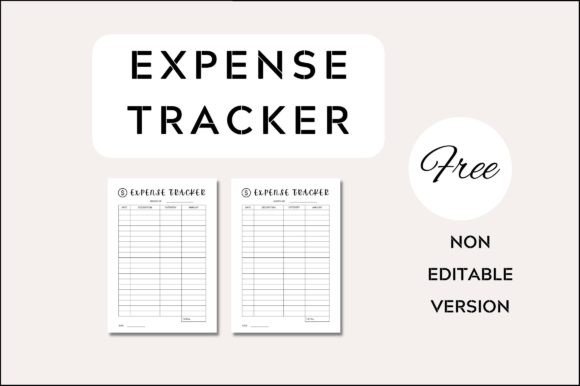
This Free Expense Tracker was built with that exact need in mind. It’s not a complicated accounting software with a steep learning curve. Instead, it’s a clean, straightforward, and highly customizable template designed for real people. Whether you're a freelancer tracking project costs, a small business owner monitoring overhead, or an individual simply trying to get a better handle on your personal budget, this tool provides the structure you need without the unnecessary complexity. The design prioritizes clarity and ease of use, so you can spend less time figuring out the tool and more time acting on the insights it provides.
Designed for Clarity and Customization
At its core, the aesthetic of this expense tracker is minimalist and functional. It avoids clutter, using ample white space and a clear typographic hierarchy to guide your eye from one section to the next. The layout is intuitive, typically featuring dedicated columns for date, description, category, amount, and payment method. This logical structure makes it incredibly simple to log entries quickly and review them at a glance. The visual personality is professional yet approachable—it feels serious enough for business use but friendly enough for personal finance management.
The real power, however, lies in its complete customizability. Created in Canva, a free and accessible online design platform, this template is fully editable. You have the freedom to adjust every visual element to match your personal or brand style. Need to change the color scheme to align with your business identity? Simple. Want to swap out the font for one that resonates more with your brand's voice? Done. You can modify images, background colors, resize elements, and even adjust the overall layout. This level of control transforms a generic template into a personalized financial dashboard that you’ll actually want to use.
Where This Tracker Truly Shines
The applications for a versatile, editable expense tracker are vast. For entrepreneurs and small business owners, it becomes an essential tool for tracking operational costs, marketing spend, and client project expenses. The ability to customize categories means you can tailor it precisely to your business model. For freelancers, designers, and content creators, it’s perfect for separating business and personal expenses, making tax season far less stressful. You can create separate trackers for different clients or income streams, maintaining clear financial boundaries.
Beyond business, its utility extends into personal and creative realms. Use it to manage household budgets, plan for a vacation, track hobby-related spending, or monitor the costs of a DIY project. The template’s clean design also makes it suitable for bloggers and publishers who might want to share a printable resource with their audience. Because it’s so easy to edit and export in multiple formats (PNG, SVG, JPG, PDF), you can adapt it for digital use on your tablet or print it out for a tangible, hands-on approach to budgeting.
Making It Work for You: Practical Guidance
Getting started is straightforward. After downloading the template, open it in Canva. Your first step should be to review the included sample files to understand the intended structure. Then, dive into customization. Begin by setting your color palette and choosing your fonts. For a financial document, readability is paramount. Consider using a clean sans serif font for the main data entry areas to ensure numbers and text are legible at any size. You might pair this with a slightly more distinctive display font for headers to add a touch of personality without sacrificing clarity.
Think about your categories. The template likely includes common ones, but take a moment to tailor them to your specific needs. For a business, you might need categories like "Software Subscriptions," "Client Meetings," or "Advertising." For personal use, categories like "Groceries," "Utilities," and "Entertainment" are more relevant. This simple act of personalization makes the tracker exponentially more useful. Remember, the goal is to create a system that mirrors your actual life or business operations, making logging expenses a natural part of your routine rather than a chore.
A Note on Final Touches and Exporting
Once you’re happy with the design and structure, it’s crucial to remember one key detail: use your own images at the final stage before export. The template may include placeholder images for visual appeal, but for your final, personalized version, replace them with your own photos, brand assets, or even simple icons that resonate with you. This final step ensures the tracker feels uniquely yours and is free from any licensing concerns associated with the sample images.
When you’re ready to use your tracker, Canva offers multiple export options. For a digital, fillable version on a device, exporting as a PDF is often ideal. If you plan to print it, the standard A4 size works perfectly, but you can resize it to fit a letter-sized planner or a smaller booklet with just a few clicks. Saving it as a high-quality PNG or JPG is also useful if you want to use it as a digital background or share a static image of your budget plan. This flexibility ensures your free expense tracker integrates seamlessly into whatever workflow you prefer, digital or analog.
Ultimately, this Free Expense Tracker is more than just a document; it’s a design asset that brings order to financial chaos. By combining a clean, professional aesthetic with full editability, it empowers you to take control of your finances in a way that feels organized, personalized, and—most importantly—manageable. Download it, make it your own, and start building a clearer financial picture today.